---
title: Login to Teleporte Cloud - new
description: Teleporte users can start a session in the cloud by informing the account email and the password; or without the password, by informing the account email to generate an email link that allows access
---
[Skip to content](https://cx.sera4.com/sign-in-to-teleporte-cloud-0#main-content)
- [English](https://cx.sera4.com/sign-in-to-teleporte-cloud-0)
- [Español - México](https://cx.sera4.com/es-mx/iniciar-sesión-en-teleporte-cloud-0)
- [Português - Brasil](https://cx.sera4.com/pt-br/fazer-login-no-teleporte-cloud-0)
English
Show submenu for translations

- [Default HubSpot Blog](https://sera4-3787649.hs-sites.com/blog)
Open main navigation
Close main navigation
- [Default HubSpot Blog](https://sera4-3787649.hs-sites.com/blog)
- - [English](https://cx.sera4.com/sign-in-to-teleporte-cloud-0)
- [Español - México](https://cx.sera4.com/es-mx/iniciar-sesión-en-teleporte-cloud-0)
- [Português - Brasil](https://cx.sera4.com/pt-br/fazer-login-no-teleporte-cloud-0)
English
Show submenu for translations
- [Go to sera4.com](https://sera4.com/)
[Go to sera4.com](https://sera4.com/)
Hello. How can we help you?
- There are no suggestions because the search field is empty.
1. [Help Center](https://cx.sera4.com/?hsLang=en)
2. [Onboarding](https://cx.sera4.com/onboarding?hsLang=en)
3. [Intro for Administrators](https://cx.sera4.com/onboarding?hsLang=en#intro-for-administrators)
# Login to Teleporte Cloud - new
## Teleporte users can start a session in the cloud by informing the account email and the password; or without the password, by informing the account email to generate an email link that allows access
### Email Link Login
Users don't need a password to access Teleporte. They can simply receive email links that are valid for 10 minutes to sign in. This is the most secure method to sign in.
#### **Important Note: Cross-Platform Limitations for Passwordless Links**
When signing in to our applications, it's crucial to understand that passwordless links generated from our Mobile app platform are distinct from those generated within our Cloud platform.
**Key Points to Remember:**
1. Passwordless links generated on our Cloud platform are specific to the Cloud environment.
2. Passwordless links generated on our App platform are exclusive to the App environment.
3. Ensure that you use the passwordless link in the platform where it was requested. The links are not cross-platform compatible.
By adhering to these guidelines, you'll seamlessly access the intended platform and enjoy a hassle-free sign-in experience.
For any further clarification or assistance, please refer to our support resources or reach out to our support team at **support@sera4.com**.
### Password Login
If users have a password configured, they can sign in using their password. To log in using a password:
### **Multi-Factor Authentication/Time-Based One-Time Password Code**
If your account has Multi-Factor Authentication (MFA) enabled, you will be prompted to enter your Time-Based One-Time Password (TOTP) code after signing in with either your email link or password. Learn [here](https://cx.sera4.com/how-to-configure-mfa-for-your-teleporte-account?hsLang=en) how to configure your MFA when prompted during the sign in.
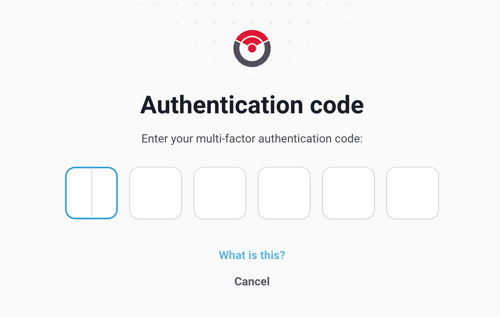
This code can be obtained from the TOTP tool you registered when you configured the MFA for your account.
- [Onboarding](https://cx.sera4.com/onboarding?hsLang=en#main-content)
- [Intro to Teleporte](https://cx.sera4.com/onboarding?hsLang=en#intro-to-teleporte)
- [Intro for Users](https://cx.sera4.com/onboarding?hsLang=en#intro-for-users)
- [Intro for Administrators](https://cx.sera4.com/onboarding?hsLang=en#intro-for-administrators)
- [Mobile Application](https://cx.sera4.com/onboarding?hsLang=en#mobile-application)
- [Web Interface](https://cx.sera4.com/onboarding?hsLang=en#web-interface)
- [AP3 Padlock](https://cx.sera4.com/onboarding?hsLang=en#ap3-padlock)
- [Controllers](https://cx.sera4.com/onboarding?hsLang=en#controllers)
- [KSC1](https://cx.sera4.com/onboarding?hsLang=en#ksc1)
- [Job Tracking](https://cx.sera4.com/onboarding?hsLang=en#job-tracking)
- [FAQ](https://cx.sera4.com/faq?hsLang=en#main-content)
- [Mobile App](https://cx.sera4.com/faq?hsLang=en#mobile-app)
- [Web Interface](https://cx.sera4.com/faq?hsLang=en#web-interface)
- [AP3 Padlock](https://cx.sera4.com/faq?hsLang=en#ap3-padlock)
- [Security](https://cx.sera4.com/faq?hsLang=en#security)
- [Troubleshooting](https://cx.sera4.com/troubleshooting?hsLang=en#main-content)
- [General Troubleshooting](https://cx.sera4.com/troubleshooting?hsLang=en#general-troubleshooting)
- [AP3 Padlock Troubleshooting](https://cx.sera4.com/troubleshooting?hsLang=en#ap3-padlock-troubleshooting)
- [Web Interface Troubleshooting](https://cx.sera4.com/troubleshooting?hsLang=en#web-interface-troubleshooting)
- [Resources](https://cx.sera4.com/resources?hsLang=en#main-content)
- [Documents](https://cx.sera4.com/resources?hsLang=en#documents)
- [Installation Guides](https://cx.sera4.com/resources?hsLang=en#installation-guides)
- [Manuals](https://cx.sera4.com/resources?hsLang=en#manuals)
- [Product Portal](https://cx.sera4.com/resources?hsLang=en#product-portal)
- [Default HubSpot Blog](https://sera4-3787649.hs-sites.com/blog)
[](http://sera4.com)
For all additional inquiries, please message us at cx@sera4.com
Copyright © 2025, Sera4
```json
{
"@context" : "https://schema.org",
"@type" : "VideoObject",
"contentUrl" : "https://3787649.fs1.hubspotusercontent-na1.net/hubfs/3787649/video_assets/213208976654/inherited/web_optimized.mp4",
"dateModified" : "2026-05-20T13:28:31.480Z",
"duration" : "PT33.233S",
"height" : 720,
"name" : "passwordless_EN_final",
"thumbnailUrl" : "https://3787649.fs1.hubspotusercontent-na1.net/hubfs/3787649/passwordless_EN_final.mp4/medium.jpg",
"uploadDate" : "2026-05-19T21:04:22.457Z",
"width" : 1280
}
```
```json
{
"@context" : "https://schema.org",
"@type" : "VideoObject",
"contentUrl" : "https://3787649.fs1.hubspotusercontent-na1.net/hubfs/3787649/video_assets/213208985165/inherited/web_optimized.mp4",
"dateModified" : "2026-05-19T21:05:31.569Z",
"duration" : "PT24S",
"height" : 1624,
"name" : "password_login_EN",
"thumbnailUrl" : "https://3787649.fs1.hubspotusercontent-na1.net/hubfs/3787649/password_login_EN.mov/medium.jpg",
"uploadDate" : "2026-05-19T21:05:16.698Z",
"width" : 2878
}
```