
Important: Before proceeding with the installation, check the compatibility of the KSC1with the existing lock hardware. Review the compatibilty section on this guide.
Tools and Requirements:
- Existing lock hardware key.
- 1/16 inch Allen Key
- Teleporte mobile app with a key assigned to the core. This is required to configure the KSC1 in ACTIVATED mode.
Installation steps
- Remove the mechanical SFIC core as instructed by its manufacturer. In the case of BEST SFIC cores for example, you need to insert the control key into the existing lock hardware, and rotate 15° clockwise to gently pull the lock core out.
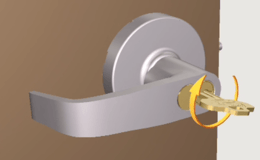
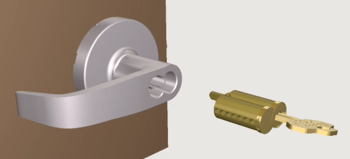
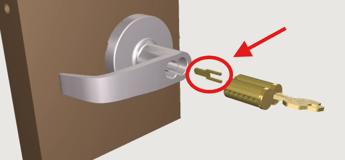
- If applicable, remember to keep the throw member from the existing hardware lock, as it will be reused for the KSC1 core. If the throw member or throw pins do not come out from the lock core, leave them with the lock.
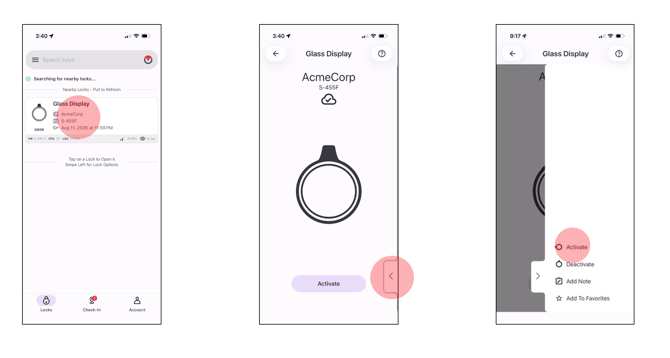
- Configure your KSC1 in ACTIVATED mode by:
- Opening the Teleporte Mobile application
- Selecting the KSC1 on the screen once it has been detected by the app
- Open menu in the bottom right corner
- Select option to ACTIVATE
- Remove the battery cap from the KSC1 core with the donut magnet, if it hasn't been removed
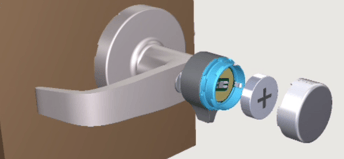
- Insert the KSC1 core into the lever handle or lock. (If the throw member / throw pins came out with the original lock core, install them into the KSC1 core first, then insert the KSC1 core into the lever handle.)
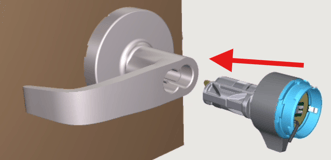
Check the KSC1 orientation before inserting it. If the control lug is not retracted (extended) move the knob until the Allen hole is aligned, and use the 1/16 inch Allen key to rotate it counterclockwise to retract the control lug, leaving the KSC1 core on "installation" mode.
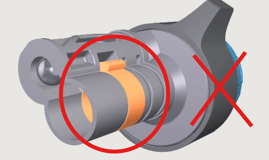
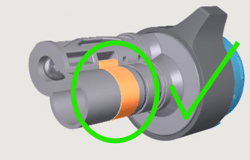
- Use the 1/16 inch Allen Key to secure the KSC1 core. Remove the 1/16inch Allen key and pull from the knob to ensure the KSC1 core is secured.
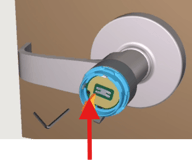
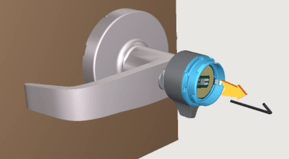
Insert the battery with the positive polarity facing out. Align the battery cap with the KSC1 knob and press it until the cap snaps secure in place. 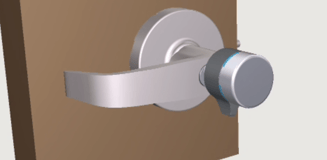
With the cap in place, you have finished with the KSC1 installation, You can use the Teleporte app to interact with the Lock.
KSC1 Compatibility Guide
- Is your lock fitted with a 7-pin small-format interchangeable core?
If Yes, continue with the next step. If no or unsure, please send an email to support@sera4.com - When installed, does the face of the core fit flush with the hardware?
If Yes, proceed with the next steps, If no or unsure, please send an email to support@sera4.com
Functional Compatibility
If your hardware has an egress lever
Using your existing hardware and an operate key, insert the operate key
into the core. Slowly rotate the operate key clockwise through the
hardware's full range of operation while simultaneously and frequently
checking the egress lever for any issues that could impede free egress.
Repeat the procedure while rotating the operate key counterclockwise
through the full range or operation. Always ensure that the KSC1 Core
does not affect egress.
If your hardware has a thumb turn or a pushbutton
Using your existing hardware and an operate key, insert the operate key
into the core. Slowly rotate the operate key clockwise through the
hardware's full range of operation while simultaneously and frequently
checking the thumb turn or pushbutton for any functional issues such as
jamming, catching, or the lock not functioning as designed (e.g. pressing
in the pushbutton does not lock the exterior lever). Repeat the procedure
while rotating the operate key counterclockwise through the full range
or operation.